Do You Need a DAC for Listening to J-POP? 5 Things Beginners Should Know
[Advertisement] This post is part of the Coupang Partners program, and I receive a commission for it.
A DAC is a device that converts digital signals into analog signals that earphones or headphones can play when you listen to music on a smartphone, PC, or laptop. If vocals sound rough when listening to J-POP, if you hear white noise on your PC, or if connecting wired earphones feels inconvenient, it is a piece of music-listening equipment worth checking at least once.
However, it is not essential for everyone. If you only use Bluetooth earphones, the priority may be low. If you are already satisfied with the sound from your smartphone or laptop, there is no need to buy one in a hurry. The difference is more likely to be felt by people who use wired earphones or wired headphones.
Hanip Summary
| Situation | DAC Necessity | Reason | Things to check first |
|---|---|---|---|
| When you want to connect wired earphones to a smartphone | High | On devices without a 3.5 mm jack, a USB audio adapter may be necessary. | USB-C, Lightning, and 3.5 mm jack support |
| When you hear white noise on a PC | Medium to high | Depending on the built-in sound environment, noise may be noticeable. | Other earphones, other ports, volume settings |
| When you only use Bluetooth earphones | Low | Wireless earphones usually process sound through their own chipset. | Whether you plan to use wired equipment |
| When you only expect high-resolution audio quality | Medium | Connection stability, output power, and noise differences may be felt before differences in audio source quality. | Audio source quality, app settings, earphone sound signature |
What Is a DAC? A Beginner-Friendly Explanation
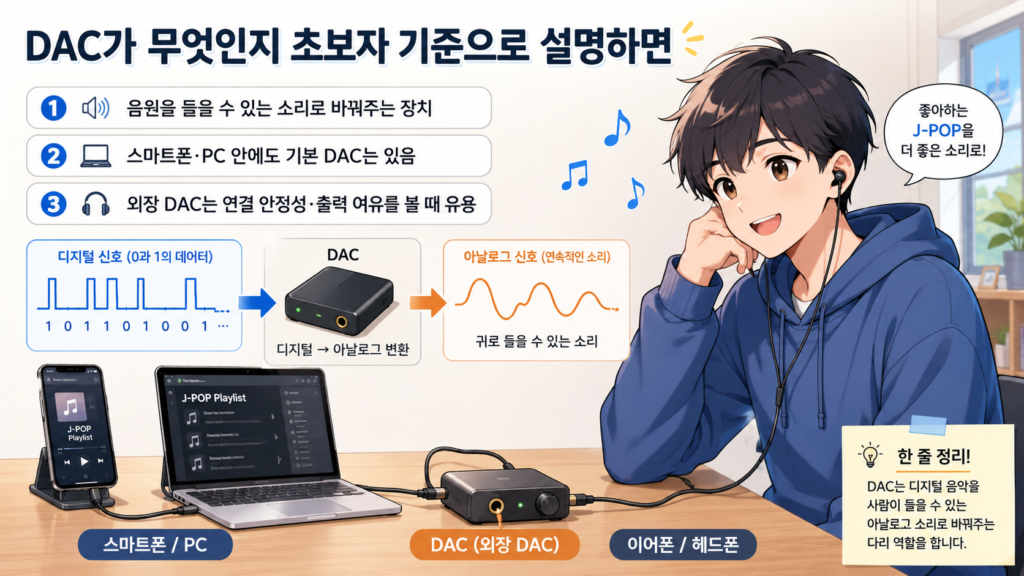
Music files and streaming audio are digital signals. Earphones and headphones do not play those signals directly. The signal is converted into analog sound that humans can hear, and the device responsible for that conversion is a DAC.
In fact, smartphones, PCs, and laptops already have audio devices inside them. That is why you can listen to music without any separate equipment. It is more realistic to think of an external sound device not as something that “automatically makes the sound better,” but as a way to check wired connection, output headroom, noise reduction, and connection stability.
If you are first wondering which earphones or headphones to choose, it is also good to read 2 Tips for Choosing the Best Earphones for Listening to J-POP: Recommendations and 2 Tips for Choosing Headphones That Sound Great for J-POP, Plus 2 Recommendations before deciding whether beginner audio equipment is necessary.
The Difference Between Built-In Audio Devices and External Devices
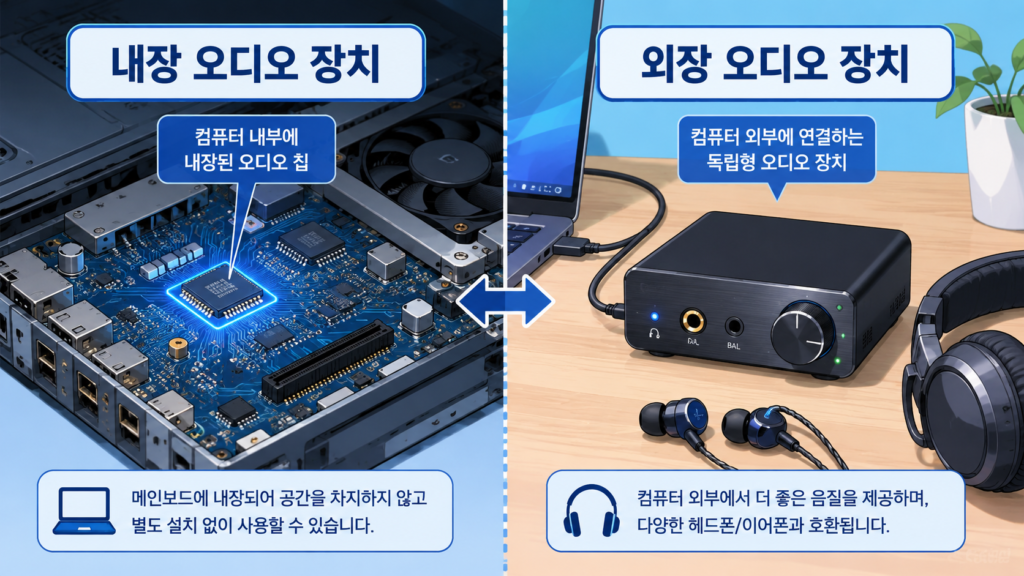
Built-in audio devices inside smartphones or laptops are often enough for basic music listening. Modern devices have better default output and noise control than before, so for casual streaming, you may not feel much inconvenience without separate equipment.
However, if the front port of your PC produces noise, the 3.5 mm jack on your laptop feels weak, or there is no way to connect wired earphones to your smartphone, a dongle DAC or USB audio adapter may help.
- Built-in audio: No separate purchase is required, and it is the simplest option.
- External sound device: It can help separately address wired connection, volume headroom, and noise issues.
- Dongle-type product: Easy to connect lightly to smartphones and laptops.
- Desktop-type product: Worth comparing for people who use headphones or speakers together at a desk.
Important Points for Listening to J-POP
J-POP often centers on vocal melodies, while guitars, piano, synths, drums, and bass are densely layered behind them. Because of that, it is good to check whether female vocals sound too thin or rough, and whether guitars, drums, and vocals in band songs get mixed together into one mass of sound.
When choosing audio-improvement equipment, rather than looking first at high-resolution audio support numbers, it is better to check whether noise is reduced in your actual listening environment, whether you can secure enough volume, and whether the wired earphone connection is stable.
Situations Where the Difference May Be Easier to Feel
- When you hear white noise while listening to music on a PC
- When you want to connect wired earphones to a smartphone
- When vocals feel rough or thin
- When the sound feels stuffy even after raising headphone volume
- When guitars, drums, and vocals sound congested in band songs
If you are wondering whether muddy sound or buried vocals are caused by settings, also check 7 Tips for Setting Up FxSound for the First Time . Before buying equipment, it can help to first check how your output device, volume, and EQ are set.
5 Things Beginners Should Know
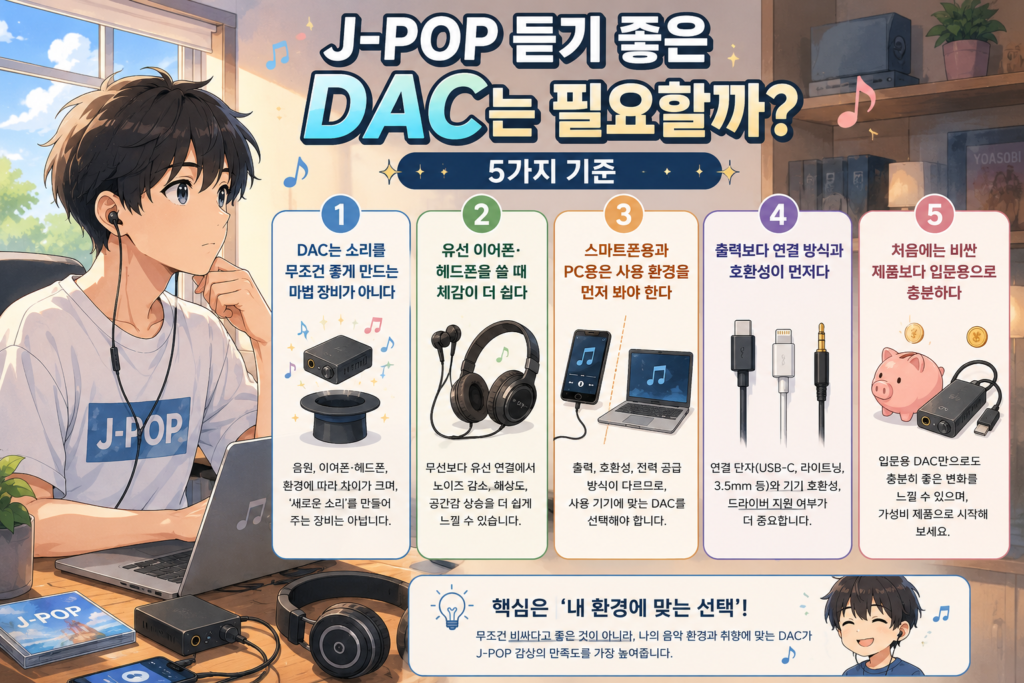
1. A DAC Is Not a Magic Device That Automatically Improves Sound
Connecting an external audio device does not mean every song will change dramatically. The sound signature of your earphones or headphones, audio source quality, app settings, volume, and surrounding noise all affect what you hear.
For beginners, it is better to ask “Is the problem I am experiencing related to connection, output, or noise?” rather than simply asking “Will the sound become better?”
2. The Difference Is Easier to Feel When Using Wired Earphones or Headphones
A dongle DAC is usually used when connecting wired earphones or wired headphones. It is worth comparing when your smartphone does not have an earphone jack or when your laptop output feels weak.
On the other hand, if you only use Bluetooth earphones, the priority is low. Wireless earphones process sound in a different way between the device and the earphones.
3. For Smartphones and PCs, Check Your Usage Environment First
If smartphone music listening is your main use, a small and light adapter-type or dongle-type product is convenient. You should check whether it can be used while charging, whether it connects while your case is on, and whether USB-C or Lightning compatibility matches your device.
If you mainly use a PC or laptop, you should also check cable length, whether a driver is required, microphone input, volume control method, and desk placement.
4. Connection Method and Compatibility Come Before Output Power
A higher output number is not always the better choice. For beginners, it is more important to first check whether the device connects to your equipment, whether the earphone jack matches, whether your smartphone recognizes it properly, and whether a driver is required on PC.
In particular, iPhone, Android, Windows PC, and MacBook may use different connection methods, so it is good to check the product page and official information before buying.
5. For a First Purchase, an Entry-Level Product Is Enough
There is no need to choose an expensive product from the beginning. If you are not yet clear whether you want wired earphone connection, PC noise reduction, or headphone output support, it is more realistic to start by comparing light entry-level options.
After your frequently used equipment and music style become clearer, you can slowly look at elements such as higher output, more ports, volume knobs, and dedicated app support.
The Difference Between Dongle-Type and Desktop-Type Devices
| Product Types | Advantages | Things to keep in mind | Recommended for |
|---|---|---|---|
| Smartphone adapter type | Small, light, and easy to approach for connecting wired earphones. | Output power and features may be simple. | People whose clear purpose is to connect 3.5 mm wired earphones to a smartphone |
| Entry-level dongle type | Good for use with both smartphones and laptops, and easy to carry. | You need to check compatibility, heat, and battery consumption by device. | People who want to use wired earphones or light headphones more stably |
| External sound device for PC and laptop | Good for managing volume control, microphone use, and headphone connection together at a desk. | Portability is lower, and depending on the product, a driver or dedicated app may be required. | People who feel noise or lack of output on a PC |
| Desktop audio equipment | Many products offer more input and output ports and greater output headroom. | More budget and installation space may be required. | People who use headphones and speakers together at a desk |
If you are also considering speakers, it is useful to read this together with 3 Tips for Choosing a Good Speaker for Listening to J-POP . Speakers are affected not only by the equipment itself but also by room structure and placement, so they should be judged by different standards from wired earphones.
Pre-Purchase Checklist
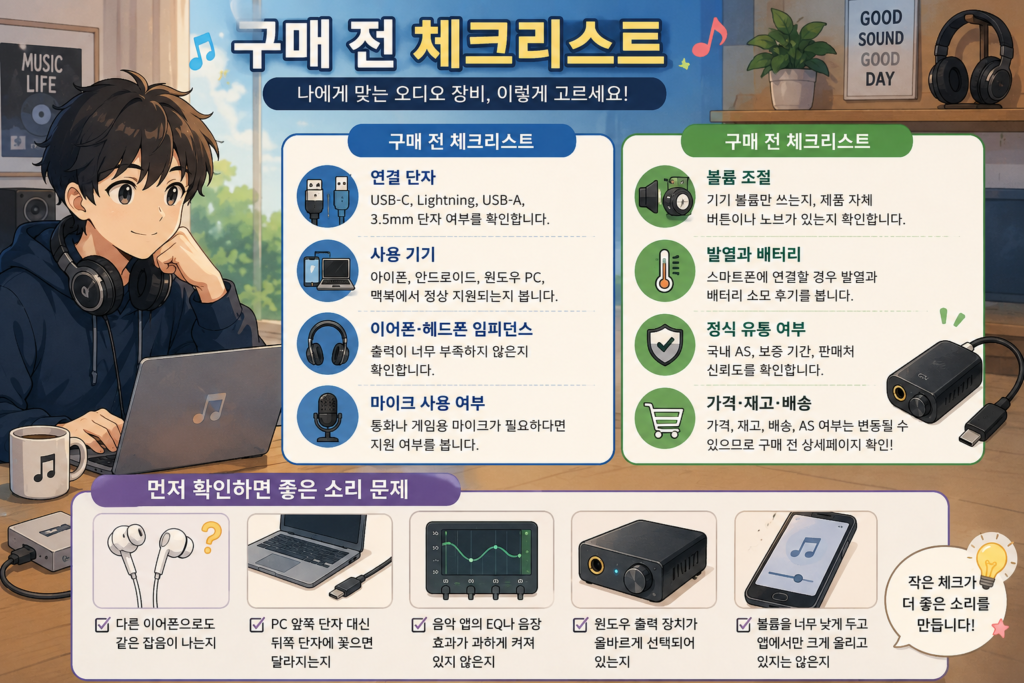
- Connection ports: Check for USB-C, Lightning, USB-A, and 3.5 mm jack support.
- Devices used: Check whether it is properly supported on iPhone, Android, Windows PC, and MacBook.
- Earphone and headphone impedance: Check whether the output is not too weak.
- Microphone use: If you need a microphone for calls or gaming, check whether it is supported.
- Volume control: Check whether you will only use the device volume or whether the product itself has buttons or a knob.
- Heat and battery: When connecting to a smartphone, check reviews about heat and battery consumption.
- Official distribution: Check domestic after-sales service, warranty period, and seller reliability.
- Price, stock, and delivery: Price, stock, delivery, and after-sales service availability can change, so it is best to check the product page before buying.
Sound Problems to Check First
- Whether the same noise occurs with other earphones
- Whether the sound changes when plugged into the rear PC port instead of the front port
- Whether the music app’s EQ or sound effects are turned on too strongly
- Whether the correct Windows output device is selected
- Whether the device volume is set too low while only the app volume is raised
3 Recommended Product Examples
The product names below are examples to help you understand possible purchase candidates. They are not presented as definitive user reviews. Product names, ports, compatibility, supported specifications, prices, stock, and after-sales service availability can change over time. It is best to check the product page and official manufacturer information before buying.
1. The Lightest Smartphone Adapter Type to Start With: Belkin RockStar 3.5 mm Audio USB-C Charging Adapter
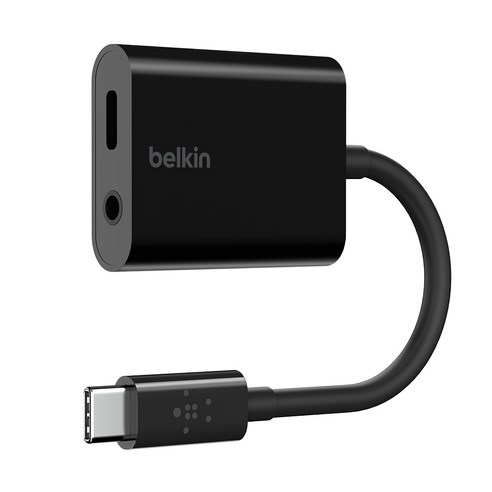
If your smartphone does not have a 3.5 mm earphone jack and you want to lightly connect wired earphones, you can compare products such as the Belkin RockStar 3.5 mm Audio USB-C Charging Adapter. Rather than buying expensive equipment right away, this is a good direction for first checking whether you often use wired earphone connection.
This type is small, light, and easy to carry, so it is approachable for people who mainly listen to music on a smartphone. However, the functions are simple, and depending on your smartphone or case, there may be compatibility issues or physical interference, so it is best to check the product page before buying.
- Advantages: Small, light, and easy to carry.
- Things to keep in mind: The functions are simple, and compatibility needs to be checked on some devices.
- Recommended for: People whose clear goal is to connect wired earphones to a smartphone
- Things to check: USB-C support, charging support, microphone support, case interference, authenticity
Check the Belkin RockStar 3.5 mm Audio USB-C Charging Adapter on Coupang
2. Entry-Level Dongle DAC: AZLA Smart DAC A100 Silver
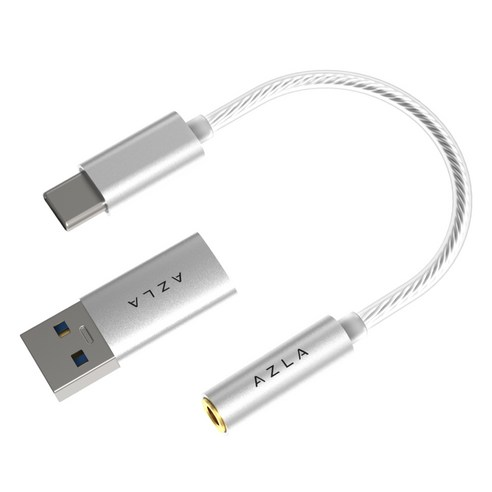
If you are looking for something a little closer to music-listening equipment than a basic adapter, you can compare a dongle DAC such as the AZLA Smart DAC A100 Silver. This type suits people who want to use wired earphones a little more stably on a smartphone or laptop.
Dongle-type products are small and easy to carry, so they are good to consider for both smartphone music listening and laptop use. However, device compatibility, heat, battery consumption, and microphone support can differ by product, so it is best to check the product page before buying.
- Advantages: Easy to carry and good to consider for both smartphone and laptop use.
- Things to keep in mind: Compatibility, heat, and battery consumption need to be checked by device.
- Recommended for: People who often use wired earphones and want a slightly more stable connection than a basic adapter
- Things to check: USB-C support, output power, supported operating systems, microphone support, after-sales service policy
Check the AZLA Smart DAC A100 Silver on Coupang
3. A More Serious Portable DAC / Headphone Amplifier: HIBY W4
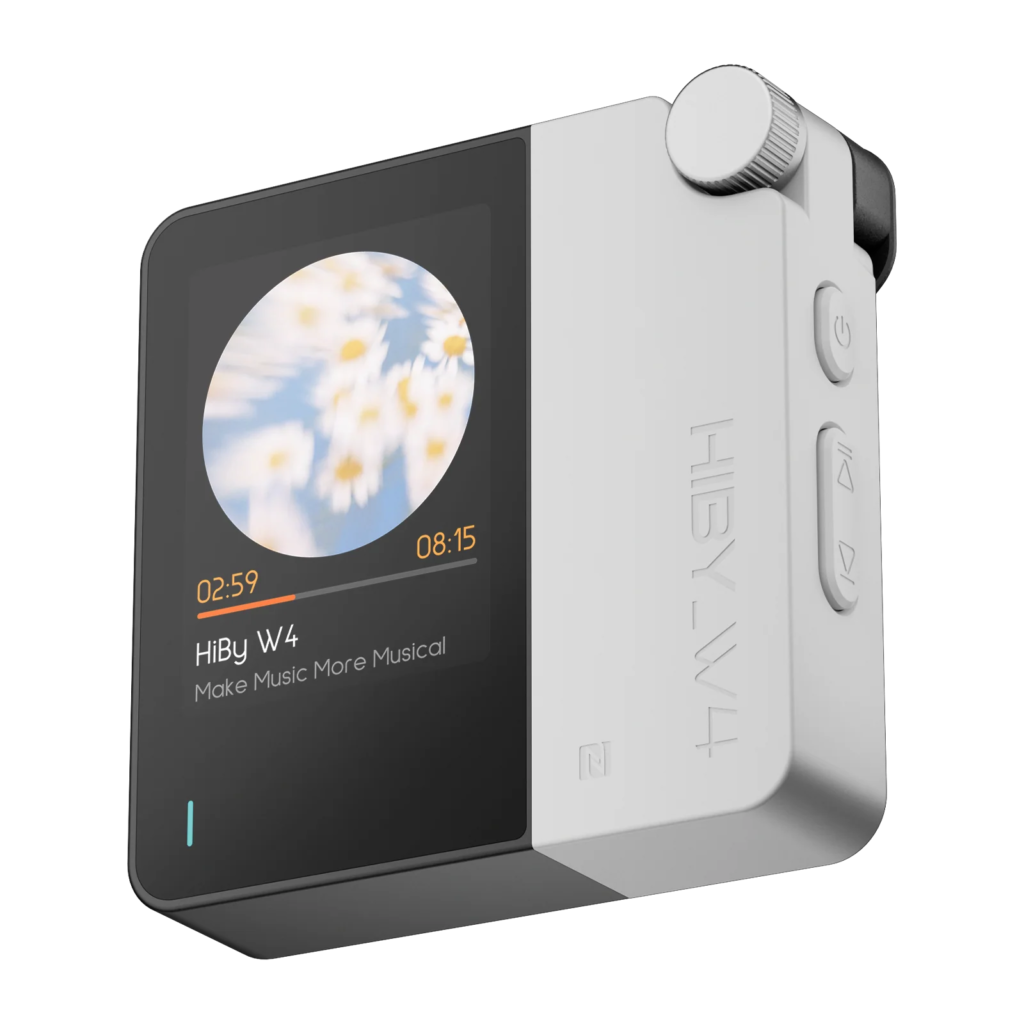
If you want to use wired earphones and headphones more seriously not only with a smartphone but also with a PC or laptop, you can compare products such as the HIBY W4 touchscreen-type portable wired/wireless DAC headphone amplifier. It has more features than a simple adapter, so it is a suitable direction for people who want to expand their music-listening equipment a little further.
This type can be an option when considering wired earphones, headphones, and PC music listening together. However, it may be more expensive than an entry-level adapter, and because it has more functions, it is important to carefully check compatibility, connection method, output, battery, and app support.
- Advantages: Good for using wired earphones or headphones more seriously with smartphones, PCs, and laptops.
- Things to keep in mind: It may cost more than a simple adapter, and features and compatibility need to be checked.
- Recommended for: People who often use wired earphones or headphones and want to expand their music-listening equipment a little more
- Things to check: Connection method, output, supported devices, battery, app support, after-sales service policy
Check the HIBY W4 Portable DAC Headphone Amplifier on Coupang
5 J-POP Songs That Are Good for Testing
If you have connected a new external sound device, it is better to compare different genres rather than repeatedly listening only to famous songs. Listening to vocal-focused songs, band sound, electronic sounds, and bass-heavy songs together makes it easier to check differences in connection stability, noise, and instrument separation.
| Purpose of the Test | Song | Key Points to Listen For |
|---|---|---|
| Vocal clarity | TOMOO – Super Ball | Check whether the voice stays naturally centered without becoming thin when the piano and vocal come in together. |
| Vocal clarity | Tani Yuuki – W/X/Y | Listen to whether the soft vocal gets buried or sounds stuffy when it overlaps with lower instruments. |
| Instrument separation | Kroi – Hyper | In an arrangement that mixes funk, rock, and groove, check whether the bass, drums, and guitar become one muddy mass. |
| Instrument separation | Penthouse – Natsu ni Negai wo (夏に願いを) | Listen to whether instrument positions overlap in a stuffy way when band sound and pop vocals come together. |
| Bass and spaciousness | Wednesday Campanella (水曜日のカンパネラ) – Edison (エジソン) | Check whether the bass spreads excessively or whether the space stays organized when electronic sounds, rhythm, and vocals come in at the same time. |
When testing, it is best to switch between built-in audio and the external device while listening to the same section of the same song. If the difference is not large, there is no need to force yourself to move to a more expensive product.
Recommended for people like this
- Want to connect wired earphones to a smartphone
- Are bothered by white noise or noise on a PC
- Feel that their wired headphones do not have enough volume
- Want to check why J-POP vocals sound rough or thin
- Want to use the same earphones between a laptop and a smartphone
- Want to lightly compare beginner audio equipment
Cases Where You Do Not Need to Buy One in a Hurry
- You only use Bluetooth earphones and have no plan to use wired equipment
- You have no major complaint about the current sound of your smartphone or laptop
- The issue is not noise, but that you do not like the sound signature of the earphones themselves
- Music app EQ settings are applied too strongly
- You are trying to change equipment only based on high-resolution audio numbers
At first, rather than changing equipment, it is good to write down what environment makes you feel uncomfortable. The clearer the reason is, such as “I need wired connection on my smartphone,” “There is noise on my PC,” or “My headphone volume is not enough,” the easier the choice becomes.
Frequently Asked Questions
Will a DAC Immediately Improve J-POP Sound Quality?
Not always. What you feel can vary depending on your earphones, headphones, audio source, volume, app settings, and device condition. It can help in situations where there is noise or wired connection is needed, but it does not create a big difference in every environment.
Do I Need One If I Only Use Bluetooth Earphones?
In most cases, the priority is low. Bluetooth earphones process sound internally during the wireless connection process, so their purpose is different from equipment used to connect wired earphones.
Are a Dongle DAC and a USB Audio Adapter the Same Thing?
There is some overlap. Small USB-C or Lightning-type external audio devices are often called dongle-type products. However, output power, supported functions, microphone support, and compatibility can differ by product.
Should I Look at Smartphone Use or PC Use First?
Base your decision on the device you listen with most often. If you mostly listen on a smartphone, look first at portability and port compatibility. If you mostly listen on a PC, it is better to consider noise, drivers, volume control, and microphone input together.
Will an Expensive Product Make a Bigger Difference?
Not always. At the entry level, solving your current problem matters more than price. If your goal is wired connection, a light adapter may be enough. If PC noise is the issue, an external sound device may be a more realistic choice.
What Should I Check First Before Buying?
It is best to first check the port that connects to your device, the earphones or headphones you use, whether you need a microphone, operating system compatibility, and whether the product is officially distributed. Price, stock, delivery, and after-sales service availability can change, so make sure to check the product page before buying.