
5 FxSound Bass Adjustment Settings
If you turn on FxSound and listen to music, but the bass feels too strong, the low end sounds boomy, or vocals get buried, you can refine the EQ settings slightly. This article is not about making the bass louder. Instead, it explains how to clean up muddy low frequencies and balance vocals with rhythm when listening to music.
If concepts such as the default output device, presets, and master gain still feel unfamiliar, it is better to read 7 Tips for Setting Up FxSound for the First Time . In this article, I will explain, from a beginner’s perspective, where to reduce and what to keep when the sound feels too heavy after the basic setup has already been completed.
Hanip Summary
- When the bass feels muddy: First, lower the bass boost and check the area around 125 Hz to 250 Hz little by little.
- When vocals sound buried: Check whether only the bass has been raised, slightly clean up the low-mid range, and then listen to the vocal area.
- When the sound booms from speakers: It is better to check placement and distance from the wall before adjusting the EQ.
- When earphones feel pressurized: You should also check the wearing depth and ear tips, not just the amount of bass.
- When headphones sound too thick: Compare whether the spatial effect and low-mid range are both excessive.
2) Why Bass Can Sound Muddy
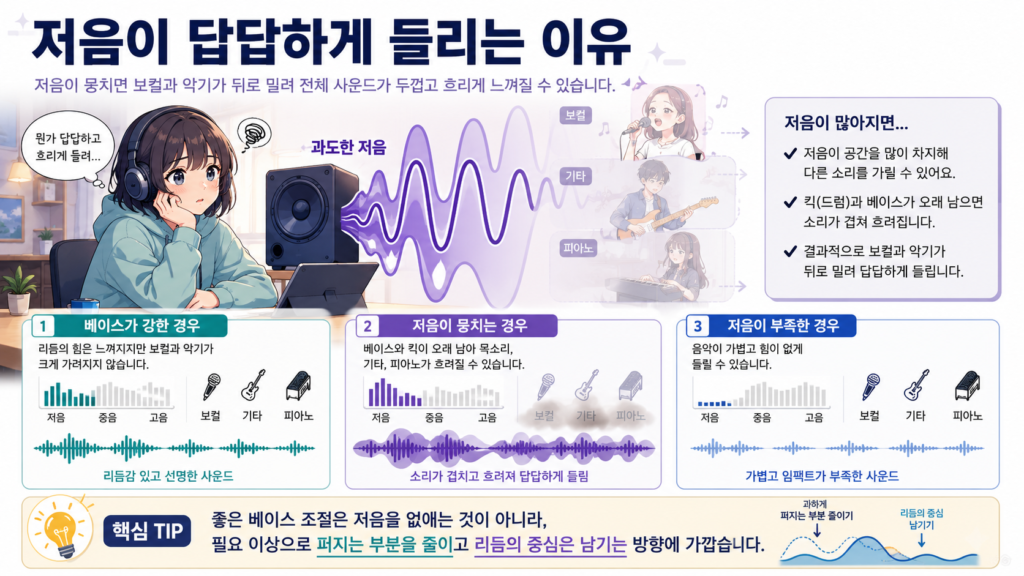
A muddy bass sound does not simply mean that the bass is loud. It can also happen when the kick drum lingers too long, when the bass covers the area around the vocals, or when only the low-mid range is exaggerated on small speakers.
When the low end is well organized, the rhythm feels solid and the song sounds stable. On the other hand, when the bass is muddy, vocals can be pushed back, guitars or pianos can become blurry, and the overall sound can feel thick and dull.
Strong bass and muddy bass are not the same.
- When the bass is strong: You can feel the power of the rhythm, but vocals and instruments are not heavily covered.
- When the bass is muddy: The bass and kick can linger too long, making vocals, guitars, and pianos sound unclear.
- When the bass is lacking: The music can sound light and weak.
Good bass adjustment is not about removing bass. It is closer to reducing the parts that spread out more than necessary while keeping the center of the rhythm intact.
3) Basic Principles for Adjusting Bass in FxSound
When adjusting bass, it is better to think “less muddy” before thinking “louder.” If you start by increasing bass boost, the sound may feel rich at first, but during long listening sessions, vocals can become stuffy.
At first, check whether bass boost, dynamic boost, or spatial effects are applied too strongly. After that, adjust the EQ bands in small steps. If you change several items at once, it becomes difficult to identify which setting was causing the problem.
Why you should not simply raise the bass
- Vocals can be pushed behind the instruments.
- The kick drum and bass can become one blurry mass.
- On small speakers, the low-mid range can become exaggerated instead of real sub-bass increasing.
- On earphones, the feeling of pressure on the ears can become stronger.
- On headphones, the sound may feel thick and blocked rather than spacious.
Even when you feel that the bass is lacking, it is better to think of the area below 60 Hz and the area around 125 Hz separately instead of raising everything immediately. Both areas can feel like bass, but the way they are perceived is a little different.
4) Things to Check When Vocals Get Buried by Bass
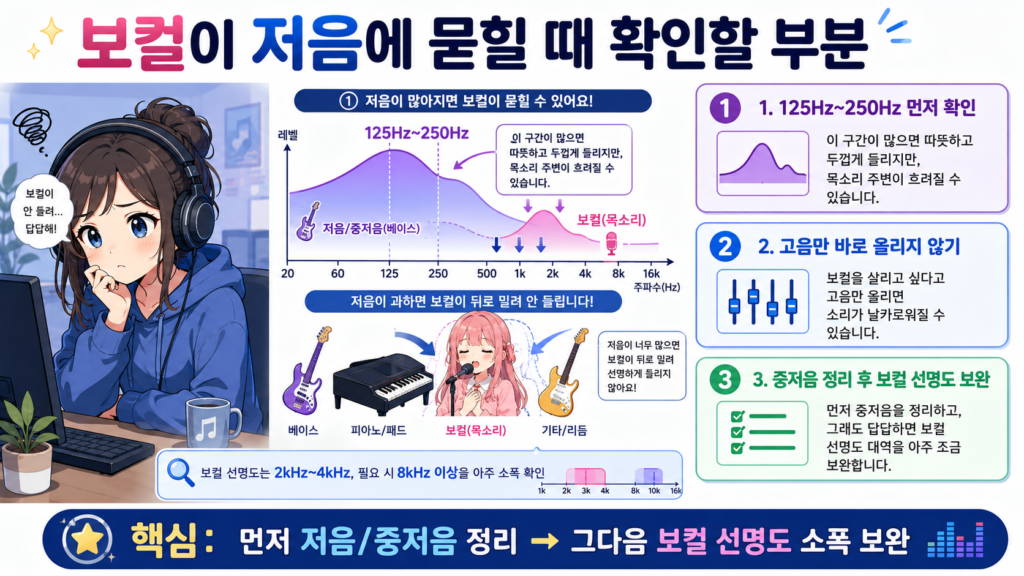
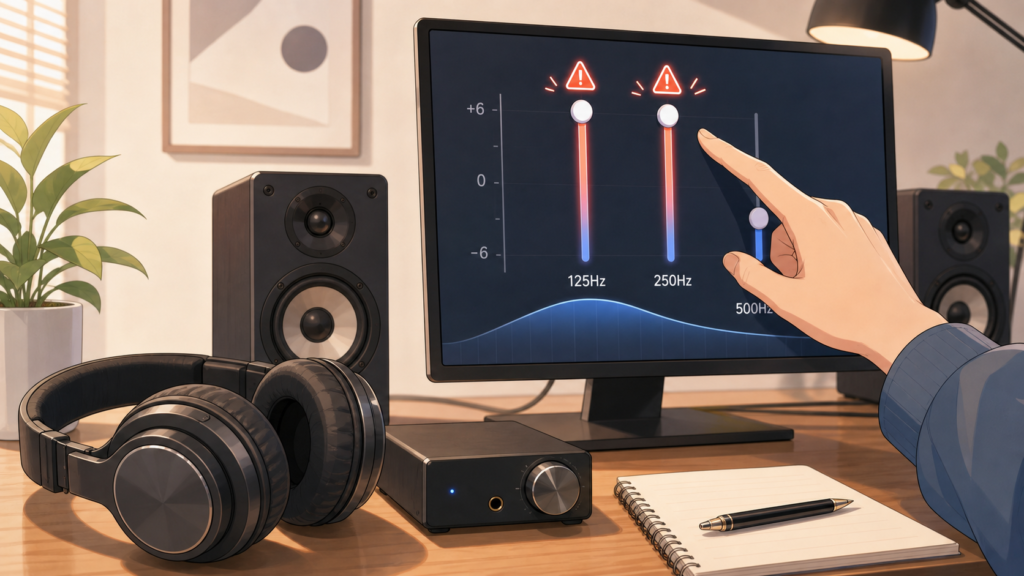
If vocals feel buried, first check whether the area around 125 Hz to 250 Hz is excessive. When this range is raised too much, the sound can feel warm and thick, but the area around the voice can also become blurred.
If you raise only the treble to make vocals easier to hear, the sound may become sharp. A more natural order is to clean up the low-mid range first, and if it still feels muddy, slightly support the vocal clarity range afterward.
If you want to look more closely at voice-focused settings, it is also useful to read the FxSound J-POP Vocal Clarity Settings . This article focuses on bass cleanup, while the vocal article covers adjustments around 2 kHz to 4 kHz and above 8 kHz in more detail.
5) How Bass Feels by Frequency Range
How bass below 60 Hz feels
The area below 60 Hz is close to deep sub-bass and a sense of grandeur that you feel with your body. Large speakers or headphones may be able to express this weight, but small laptop speakers or desk speakers may not reproduce it properly.
If you raise this area too much on small equipment, the sound may feel rough or muddy rather than gaining real deep bass. For that reason, it is better to approach sub-bass as a small supplement.
How the area around 125 Hz affects bass quantity
The area around 125 Hz creates the sense of bass quantity and warmth. When this part is balanced, music does not feel too light, and the rhythm retains its power.
However, if it is raised too much, the bass can feel larger while the area around the vocals becomes thicker. For music such as J-POP or K-POP, where vocals and synths often appear together, it is better not to raise this range excessively.
How the area around 250 Hz affects muddiness and congestion
The area around 250 Hz affects the thickness and dullness of the low end. When it is moderate, the sound can feel warm and rich. When it is excessive, the music can feel as if it is echoing inside a box.
If the issue is not that the bass is strong but that “the sound is muddy,” this is one of the first ranges to suspect. However, if you reduce it too much, the music can become thin and empty, so it is better to adjust it in small steps.
Why adjusting around 500 Hz too much can sound unnatural
The area around 500 Hz is close to the body of vocals and instruments. If you reduce this range too much because the sound feels muddy, vocals can become light and distant.
When cleaning up the low end, cutting heavily all the way up to 500 Hz can make the bass feel reduced, but the center of the whole song may feel hollow. It is better to check 125 Hz to 250 Hz first and approach 500 Hz very carefully.
6) How to Adjust Bass on Speakers
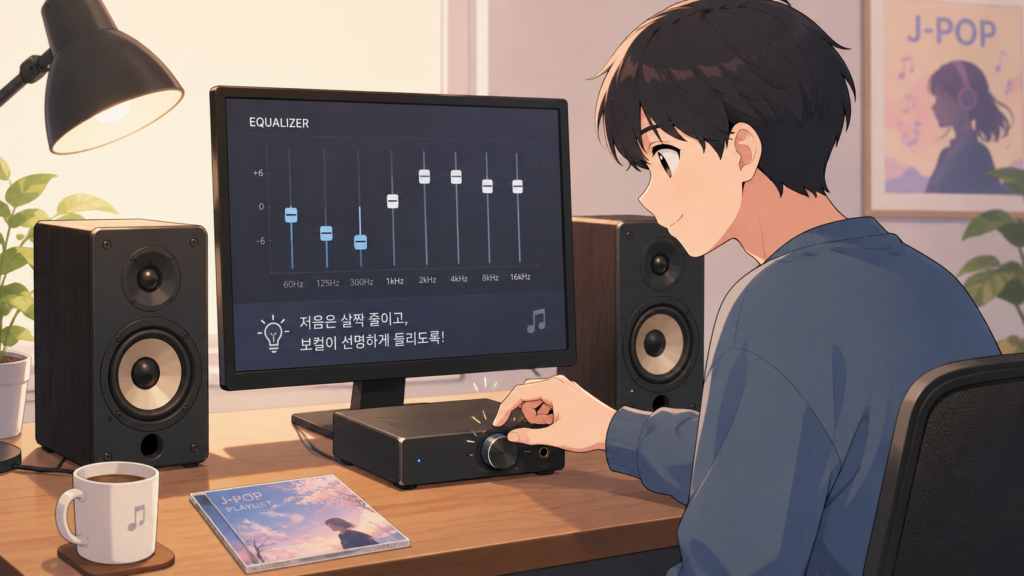
Speakers are affected by room structure and placement before EQ. If the speakers are too close to a wall or the desk resonates heavily, the bass can feel stronger even with the same settings.
- If the speakers are too close to the wall, move them slightly forward.
- If there is desk resonance, consider using stands or pads.
- If bass boost is turned on, lower it first.
- Reduce 125 Hz to 250 Hz slightly and check whether the vocals become clearer.
- It is better not to forcefully raise the area below 60 Hz on small speakers.
If you are choosing equipment to play J-POP in a room, it is also useful to first check the differences between desk speakers, Bluetooth speakers, and active bookshelf speakers in the article 3 Tips for Choosing a Good Speaker for Listening to J-POP .
7) How to Adjust Bass on Earphones

Because earphones send sound directly into the ear, bass pressure can feel stronger. In particular, with in-ear earphones, if the ear tips fit well, bass can increase, and if they go in too deeply, the sound can feel stuffy.
- Before changing the EQ, check the ear tip size and wearing depth.
- If the bass feels like it is pressing on your ears, reduce 125 Hz to 250 Hz slightly.
- Do not raise the area below 60 Hz too much; test it only in very small steps.
- If the vocals become thin, check whether you have reduced 500 Hz too much.
- It is better not to use bass boost and dynamic boost at high levels at the same time.
With earphones, even small adjustments can feel large. It is best to repeat the same chorus section for about 10 to 20 seconds and change one step at a time.
8) How to Adjust Bass on Headphones
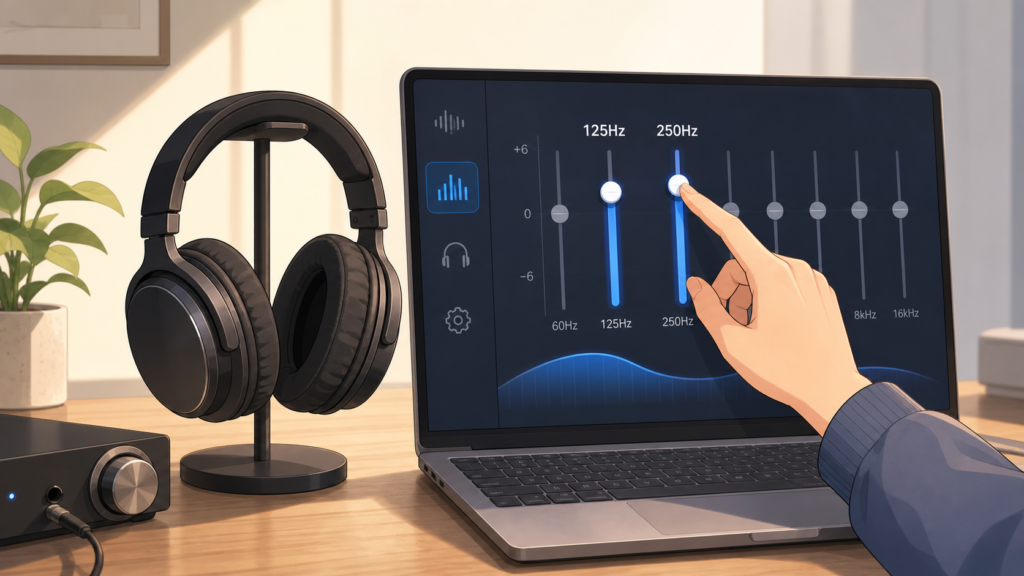
Headphones can feel more spacious than earphones, but depending on the product, the bass may sound thick. In particular, closed-back headphones can become muddy in band music or vocal-focused songs when the low-mid range is strong.
- If the bass feels thick, check 125 Hz to 250 Hz first.
- If you use a lot of spatial effect, listen to whether the vocals move too far away.
- If dynamic boost is excessive, the whole sound can feel compressed, so try lowering it.
- When raising the area below 60 Hz, check whether fatigue increases more than the sense of grandeur.
- Test at your usual listening volume so that the result matches your real listening experience.
On headphones, settings that sound fine at a low volume can feel excessive at a higher volume. Before saving a setting, it is better to compare both a low volume and your usual listening volume.
9) Bass Setting Directions by Genre
The same bass setting can sound different depending on the genre. This is because bass plays slightly different roles in J-POP, K-POP, band music, and electronic music.
When listening to J-POP
- Many songs include vocals, synths, and guitars together, so too much low-mid range can feel muddy.
- Slightly cleaning up 125 Hz to 250 Hz can make voices and instruments easier to separate.
- It is better to check vocal position and instrument separation together rather than focusing only on bass.
When listening to K-POP
- The kick and bass often create the power of the song, so reducing the bass too much can make the music feel empty.
- However, if you raise bass boost too much, vocals and rap can be pushed back.
- Check whether the rhythm sounds short and clear rather than focusing only on the amount of bass.
When listening to band music
- If the bass guitar and kick drum become muddy, even the guitars and vocals can start to feel congested.
- Too much around 250 Hz can sound warm but dull.
- Be careful not to reduce 500 Hz too much, because the body of vocals and guitars can disappear.
When listening to electronic music
- Bass is often the center of the song, so reducing it blindly can make the music less fun.
- It is better to listen separately to the weight below 60 Hz and the muddiness around 125 Hz to 250 Hz.
- If spatial, surround, or dynamic effects are used too strongly, the whole sound can feel compressed.
10) 5 Beginner-Friendly Bass Adjustment Settings
The values below are directions you can use as starting points. They can sound different depending on your device, audio source, volume, room structure, and personal preference, so do not fix them as-is. Move one step at a time and compare.
| Situation | Areas to Reduce | Areas to Increase | Changes to Consider | Points to Note |
|---|---|---|---|---|
| Areas to reduce | 125 Hz to 250 Hz, bass boost | 2 kHz to 4 kHz slightly | The booming sound may decrease, and vocals and instruments may become a little clearer. | If you reduce the bass too much, the music can sound light and weak. |
| When you want to keep the bass but make vocals clearer | Around 250 Hz slightly | Maintain 500 Hz to 1 kHz, slightly support 2 kHz to 4 kHz | The bass can retain its power while vocals feel less buried. | If you boost the 2 kHz–4 kHz range too much, the vocals may sound harsh. |
| When room resonance is severe on speakers | 125 Hz–250 Hz, excessive sense of space | Treble only very slightly | The low-mid range spreading inside the room may decrease, and the sound can become more organized. | It is better to check placement and distance from the wall before adjusting the EQ. |
| When bass on earphones feels like it presses on your ears | Below 60 Hz, 125 Hz to 250 Hz, bass boost | Maintain 500 Hz to 1 kHz as needed | The pressing feeling on the ears may decrease, and vocals may become more comfortable to listen to. | The amount of bass can change greatly depending on ear tips and wearing depth. |
| When you want to balance bass and spaciousness on headphones | Around 250 Hz, excessive dynamic boost | Use spatial effect only slightly from a low value | The thickness of the bass may decrease, and vocal and instrument placement may feel more natural. | If you raise the spatial effect too much, the vocal focus can become blurred. |
After changing the settings, make sure to compare FxSound turned on and off. At first, the side with reduced bass may feel empty, but if vocals and instruments sound more comfortable after listening to several songs, that direction may suit your equipment better.
11) 6 Songs That Are Good for Testing After Setting Changes
When checking bass settings, it is useful to listen separately to songs with bass, songs centered on vocals, and songs that mix electronic sounds with band sounds. The songs below were selected mainly from releases after 2020, while avoiding artists that have already been covered often on the blog.
| Purpose of the Test | Song | Key Points to Listen For |
|---|---|---|
| For checking bass resonance: | Creepy Nuts – Bling-Bang-Bang-Born | Check whether the kick and bass sound short and clear without spreading excessively. |
| For checking bass resonance: | ano – Chu, Tayousei. (ちゅ、多様性。) | Listen to whether the bass covers the vocals when electronic sounds and rhythm are strong. |
| For checking bass and vocal balance: | imase – NIGHT DANCER | Check whether the bass is too thick when the light groove and vocal play together. |
| For checking bass and vocal balance: | natori – Overdose | Listen to whether the low, smooth vocal floats naturally without being buried by the bass. |
| For checking electronic and band sound bass control: | Zutto Mayonaka de Ii no ni. – "Zanki" | Check whether the fast rhythm, electronic sounds, and vocals become one muddy mass. |
| For checking electronic and band sound bass control: | Eve – Fight Song (ファイトソング) | Listen to whether the bass slows down the feel of the song in sections where band and electronic sounds overlap. |
When testing, it is better to repeat short sections such as the chorus, bass-heavy parts, and parts where the vocals come in rather than listening to the whole song from start to finish. Comparing the same section makes it easier to notice small EQ changes.
Mistakes to avoid when calibrating for the first time
- Raising bass boost too much from the start: It may sound rich at first, but vocals and instruments can become buried.
- Cutting all the bass: The muddiness may decrease, but the music can lose its power.
- Lowering too much around 500 Hz: The body of vocals and instruments can disappear, making the sound unnatural.
- Ignoring speaker placement: Wall distance and desk resonance can affect the sound more than EQ.
- Save it with a specific song in mind: Other songs may sound too empty or too thick.
- Applying music app EQ at the same time: If corrections overlap, the sound can become overly compressed or unnatural.
Bass setting is not about removing bass. It is a process of cleaning up the parts that spread unnecessarily so that vocals and rhythm can come alive together. Rather than making large changes at once, it is better to make small adjustments and compare them across several songs.
Frequently Asked Questions
What should I check first when FxSound bass sounds muddy?
First, check whether bass boost is raised too much, then try reducing the area around 125 Hz to 250 Hz little by little. This range has a strong effect on bass thickness and muddiness.
What should I do if I want to keep the bass but the vocals get buried?
Rather than reducing all the bass, slightly clean up the muddiness around 250 Hz and avoid changing the vocal body around 500 Hz to 1 kHz too much. If needed, you can support 2 kHz to 4 kHz very slightly.
Does raising the area below 60 Hz make the bass better?
Not always. On large equipment, it can add a sense of weight, but on small speakers or earphones, it may not be reproduced properly or can feel rough. It is better to test this range only in small steps.
If the bass booms too much on speakers, is EQ adjustment enough?
EQ can help, but placement often comes first. If the speakers are too close to the wall or the desk resonates, the bass can become exaggerated. It is better to adjust the position slightly before fine-tuning the settings.
What should I do when earphone bass feels like it presses on my ears?
First, check the ear tip size and wearing depth. After that, lowering 125 Hz to 250 Hz and bass boost slightly can reduce the sense of pressure.
Can I raise both bass and spaciousness on headphones?
It is possible, but if you overdo it, the vocal focus can become blurred. If your headphones already have thick bass, start with a low spatial effect value and check whether the area around 250 Hz is excessive.
How do I know whether my setting is good?
Compare the same section of the same song with FxSound turned on and off. If the bass still has power, the vocals are less buried, and the sound feels less muddy even after long listening, the setting may be a good direction for your equipment.
14) Reference Sites
The bass and EQ explanations in this article are intended as a reference for understanding how sound can change by frequency range, rather than presenting one specific setting value as the correct answer.
- iZotope – EQ Cheat Sheet
This was used as a reference for the basic idea of making small adjustments where needed instead of raising the low end excessively, as well as for low-end cleanup and basic EQ concepts.
https://www.izotope.com/community/blog/eq-cheat-sheet - Songstuff – EQ Frequencies
This was used as a reference for the explanation that the area around 200 Hz to 600 Hz can be perceived as warmth, but also as muddiness or congestion.
https://www.songstuff.com/recording/article/eq-frequencies/ - Genelec – Monitor Placement
This was used as a reference for basic concepts related to speaker placement, distance from the wall, and low-frequency resonance in a room.
https://www.genelec.com/monitor-placement - ELAC – Speaker Placement Guide
This was used as a reference for the idea that left-right symmetry and listening position can change how the sound is perceived.
https://elac.com/speaker-placement-guide-get-the-best-sound-from-your-stereo
Before publishing, it is a good idea to recheck the release information for the test songs through Spotify, official YouTube videos, or the artists’ official channels.